Building a Custom Lead Management System with PHP, APIs and Automation
A practical look at how I build custom lead management systems using PHP, MySQL and API integrations, from lead capture and data enrichment to assignment, notifications, role based access and status tracking.
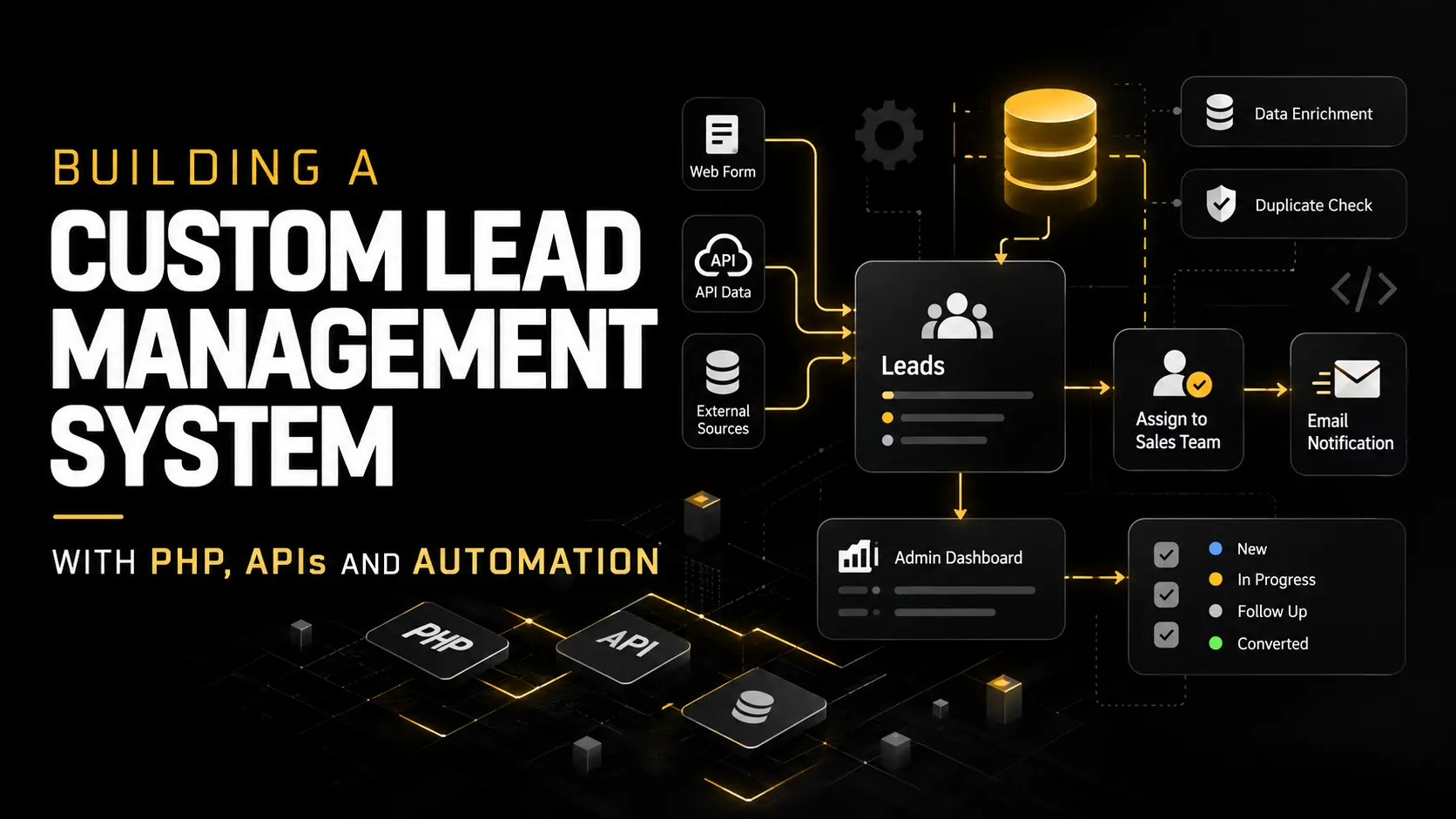
Not every business needs a large off the shelf CRM. Sometimes the real requirement is much more specific: collect leads from different sources, enrich the data, prevent duplicates, assign each lead to the right person and give the admin a simple place to manage everything.
I recently worked on this type of custom lead management workflow. Instead of forcing the existing process into a generic CRM, I built the functionality around how the business actually handles its leads.
The result was a custom PHP and MySQL based system connected with external APIs, automated processing and an internal admin dashboard.
Starting With the Actual Lead Workflow
Before building the dashboard, I mapped how a lead should move through the system.
A simplified version of the workflow looks like this:
Lead Capture → Validation → Data Enrichment → Duplicate Check → Database → Assignment → Notification → Status Management
This is important because a lead management system is not just a table containing names and email addresses. Each lead has a lifecycle, and the backend needs to understand that lifecycle.
Capturing and Storing Lead Data
The first part of the system handles incoming lead information and stores it in a structured MySQL database.
Depending on the source, a lead can contain information such as a name, company, email address, phone number, website and other business data.
Before saving the record, the backend validates and normalizes the information. This keeps the database cleaner and makes the data easier to search and process later.
I also designed the database structure around future changes rather than storing everything in one rigid format. This makes it easier to add new fields, sources or workflow requirements as the system grows.
Enriching Leads Through APIs
One of the more useful parts of the workflow is API based data enrichment.
The information initially submitted with a lead is not always enough for the sales team. An external API can provide additional information that helps turn a basic record into something more useful.
The PHP backend sends the required data to the API, processes the response and stores the relevant information against the lead.
The important part here is not simply making an API request. The integration also needs to handle missing data, invalid responses, API errors and situations where the external service is temporarily unavailable.
The lead should still remain usable even when enrichment cannot be completed immediately.
Preventing Duplicate Leads
Duplicate records quickly make a CRM difficult to use.
Before creating a new record, the system can compare important identifiers against existing leads. Depending on the project, this might include an email address, phone number, company, domain or another unique value.
Instead of blindly inserting every request into MySQL, the backend decides whether the lead is genuinely new or already exists.
This small part of the workflow can prevent a lot of unnecessary manual cleanup later.
Building a Focused Admin Dashboard
I prefer internal dashboards that show people what they actually need instead of filling the interface with unnecessary options.
For this system, the admin side provides a central place to review leads, see their current status, check assignment information and manage the workflow.
The dashboard becomes the control point for the process while the repetitive work happens automatically in the backend.
This approach is particularly useful when a business already has its own workflow and does not want to change everything just to fit an existing CRM product.
Lead Assignment and Sales Notifications
Once a lead is ready, it can be assigned to a specific sales person.
The assignment is stored against the lead so the admin can clearly see who is responsible for it.
Not every sales person needs access to the entire administration system either. In this workflow, notifications can be sent directly by email with the relevant lead information while overall management remains inside the admin dashboard.
This keeps access simpler and avoids creating unnecessary backend accounts.
Role Based Access
Internal tools often contain information that should not be available to every user.
I implemented role based access so different users can see only the areas required for their work.
For example, a dedicated lead management user can be allowed to access lead related sections without receiving access to unrelated administration tools.
Permissions are enforced by the backend rather than relying only on hiding navigation links in the interface.
That distinction matters. A hidden menu item is not a security system.
Managing Lead Status
Lead management does not end when a record enters the database.
Each lead can move through different stages as the sales team works on it. Status tracking gives the admin a clear view of where each record currently stands and what needs attention.
The exact stages can be adapted to the business rather than hard coding a generic sales process.
This is one of the main advantages of custom development. The software follows the workflow instead of forcing the workflow to follow the software.
Automation Without Losing Control
Automation works best when it removes repetitive work while keeping important decisions visible to people.
In this type of system, PHP and APIs can handle tasks such as validating incoming data, enriching records, checking duplicates, storing information, triggering notifications and preparing leads for the next stage.
The admin still controls assignment, status changes and other decisions that require human input.
That balance keeps the system useful without making the workflow unnecessarily complicated.
PHP, MySQL and APIs as a Practical Backend Stack
This project is also a good example of why I still use PHP for more than WordPress development.
With PHP, MySQL and REST APIs, I can build custom backend systems around an existing website or business process without introducing a large software stack where it is not needed.
The same approach can be used for custom CRMs, internal dashboards, order management tools, vendor systems, reporting platforms and other business applications.
Building Around the Business Process
The most important part of custom backend development is understanding what the system needs to do before deciding how to build it.
A custom lead management system can start relatively small and still support API integrations, automation, permissions, notifications and structured workflows.
Instead of adding features simply because a CRM normally has them, I prefer to build the pieces that solve the actual problem and leave room for the system to grow.
For businesses with a specific sales or operational workflow, that can be much more practical than trying to adapt every process around an off the shelf platform.