How to Customize the Dokan Vendor Dashboard for a Real Marketplace
The default Dokan dashboard works for a basic marketplace, but real projects often need a simpler and more focused vendor experience. Here’s how I approach Dokan vendor dashboard customization.
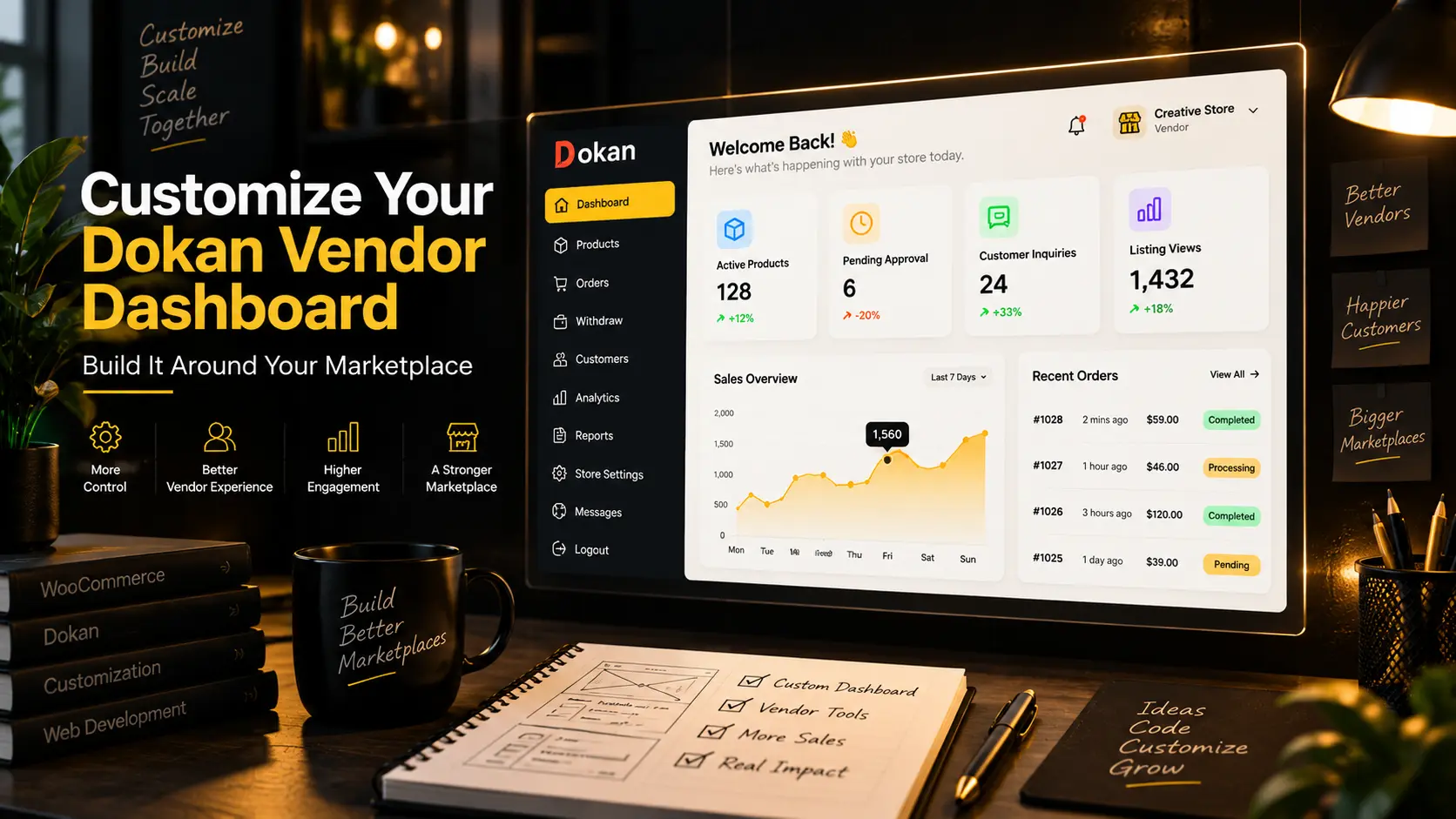
Dokan gives vendors a ready made frontend dashboard, which is one of the main reasons it works well for WooCommerce marketplaces.
But the default dashboard isn't always the right dashboard for every business.
A marketplace for physical products may need sales and order information. A directory marketplace may care more about listing views and inquiries. A specialized marketplace may need approval statuses, custom forms, messaging or completely different statistics.
This is why I usually treat the default Dokan dashboard as a starting point rather than the finished vendor experience.
Start With What the Vendor Actually Needs
The first question I ask is simple:
What does the vendor need to do after logging in?
In many projects, vendors only need a few important actions such as:
- Add or edit products
- Check listing status
- Manage orders
- Reply to customers
- Update their store
- View useful marketplace statistics
Anything that doesn't support the actual workflow can make the dashboard harder to use.
A cleaner dashboard usually works better than showing every feature available in Dokan.
Remove Unnecessary Dashboard Sections
Dokan includes several menu items and dashboard widgets by default.
Depending on the marketplace, some of them may not be useful.
For example, a marketplace that doesn't use vendor withdrawals doesn't need to give that section a prominent place in the navigation.
The same applies to reports, coupons, delivery features or other modules that aren't part of the business model.
I prefer to remove unnecessary options instead of making vendors figure out which sections they should ignore.
Add Marketplace Specific Dashboard Cards
The main dashboard should answer the vendor's most important questions quickly.
Instead of generic information, custom dashboard cards can show data such as:
Active Products
How many vendor products are currently visible on the marketplace.
Pending Approval
Products submitted by the vendor that are waiting for admin approval.
Sold or Reserved Items
Useful for marketplaces where listings move through different availability states.
Customer Inquiries
The number of buyers who contacted the vendor or asked about products.
Listing Views
How much attention the vendor's products are receiving.
These statistics are much more useful when they match the way the marketplace actually works.
Customize the Product Submission Form
The vendor dashboard is also where vendors spend most of their time adding and editing products.
The standard WooCommerce product form can contain fields that aren't relevant to a specialized marketplace.
It can also be missing fields the marketplace needs.
I often customize Dokan product forms to include things such as:
- Location
- Product condition
- Custom categories
- Delivery options
- WhatsApp contact details
- Custom attributes
- Seller specific fields
- Marketplace specific information
The goal is to make the form understandable to the vendor without exposing unnecessary WooCommerce settings.
Build a Better Approval Workflow
Many marketplaces don't want vendor products published immediately.
A common workflow is:
Vendor submits a product → product becomes pending → admin checks it → admin approves it → product appears publicly.
The vendor dashboard should clearly show each status.
A vendor shouldn't have to contact the marketplace owner just to find out whether a listing is live or waiting for approval.
Clear status labels and dashboard counters make this process easier for both sides.
Add Custom Vendor Navigation
Sometimes the marketplace needs completely new dashboard sections.
Dokan allows custom endpoints to be added to the vendor dashboard.
I use this when a project needs features such as:
- Vendor messages
- Bulk product upload
- Marketplace statistics
- Custom support
- Special shipping tools
- Verification information
- Auction management
- Custom listing management
These pages can still use the existing Dokan dashboard layout, so vendors get one consistent interface.
Track Data That Matters to Vendors
WooCommerce focuses heavily on sales data.
But sales aren't the only useful metric in a marketplace.
For some projects, I create custom tracking for:
- Product views
- Vendor profile views
- Customer inquiries
- Favorites
- External link clicks
- Contact requests
This gives vendors a better idea of how their listings are performing before a sale happens.
Keep the Dashboard Mobile Friendly
A large number of marketplace vendors manage their products from a phone.
That makes responsive dashboard development important.
Tables, forms, buttons, navigation and custom dashboard cards should all remain usable on smaller screens.
This is especially important when vendors frequently upload images or edit listings while away from a desktop computer.
Don't Modify Dokan Core Files
One important development rule is to avoid editing Dokan plugin files directly.
Plugin updates can overwrite those changes.
I normally handle Dokan customization through a child theme, custom plugin, WordPress hooks, filters and template overrides where appropriate.
This keeps the marketplace easier to maintain when WordPress, WooCommerce or Dokan are updated.
The Best Vendor Dashboard Depends on the Marketplace
There isn't one perfect Dokan dashboard layout for every project.
The right dashboard depends on what vendors sell, how listings are approved, how customers communicate with sellers and which information matters to the business.
For my marketplace projects, I focus on keeping the vendor experience simple while adding the custom functionality the business actually needs.
That can include dashboard customization, product workflows, vendor statistics, messaging, approval systems, shipping features and other WooCommerce and Dokan development.